
Libris Translate 0.28.0 · User guide
Category: Translate and review
Quality and validation
Know where to proofread first, before you deliver the book.
Steps
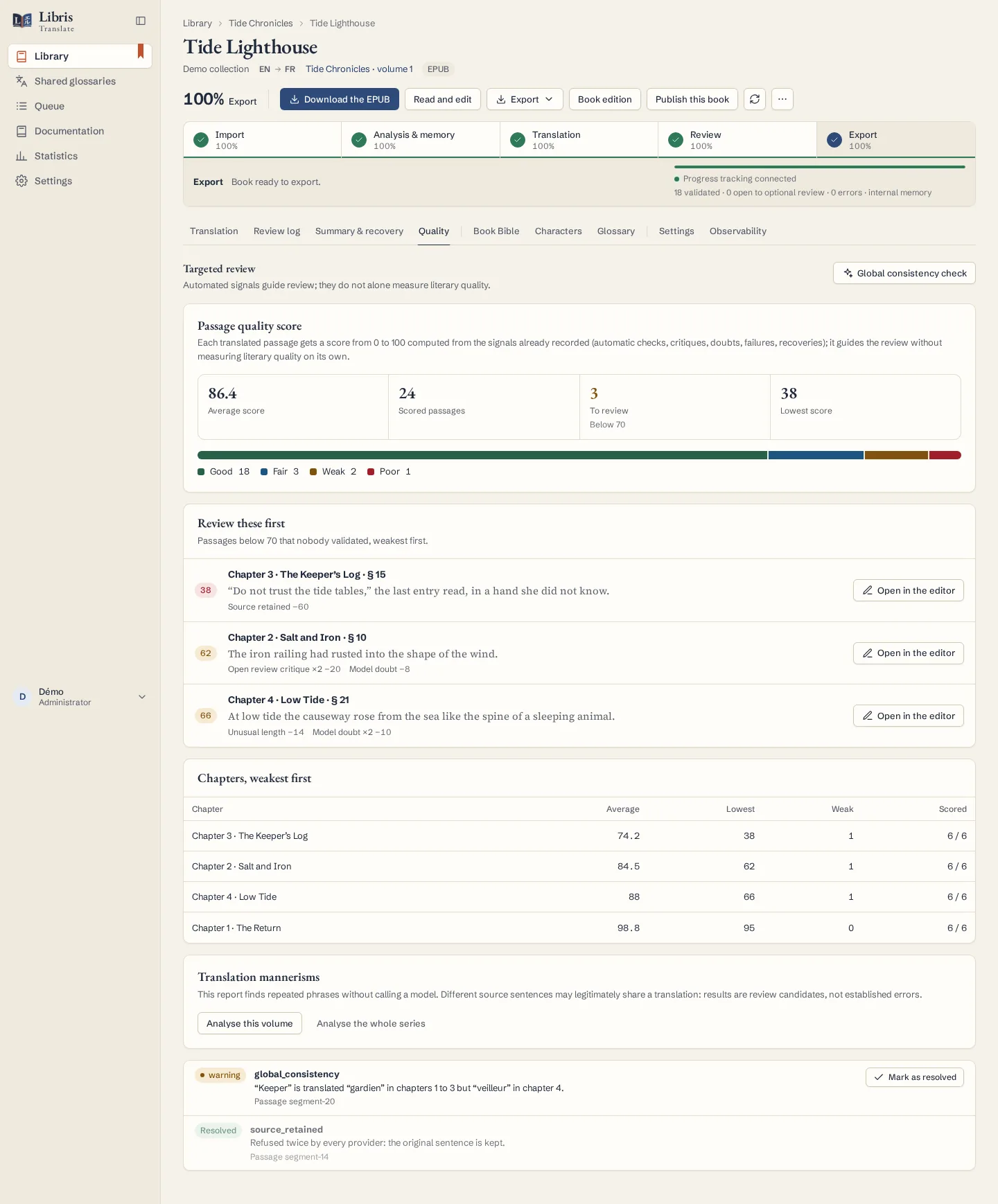
- Open the Quality tab. Every translated passage has a score from 0 to 100, shown with the average, the distribution by band and the lowest score.
- Start with “Review these first”: the passages below 70 that nobody has validated, weakest first. “Open in the editor” takes you to each one.
- In the editor, read what lowered the score (alerts, critiques and doubts still open, a length far from the source, recovery steps) before you correct, accept a proposal or validate the passage.
- Check “Chapters, weakest first” to see where problems gather, then look at the Summary & recovery tab again before exporting.
What to know
The score is computed from signals Libris Translate already records, with no extra model call. The bands are Good from 85, Fair from 70, Weak from 50 and Poor below. A passage a person validated scores 100, since someone has read it. Model calls that failed before a translation passed the checks, and critiques the arbitration applied or accepted, stay listed but cost nothing: a corrected passage is not ranked below an untouched one. A score guides proofreading; it does not measure literary quality by itself.
Fictional example
Open the lowest-scored passage of a fictional chapter, see that it lost points for a locked term it did not respect, correct the term, then click “Validate”: a passage a person validated scores 100 and leaves the priority list.