
Libris Translate 0.28.0 · User guide
Library and batch actions
Find a book, act on several at once, and set finished work aside.
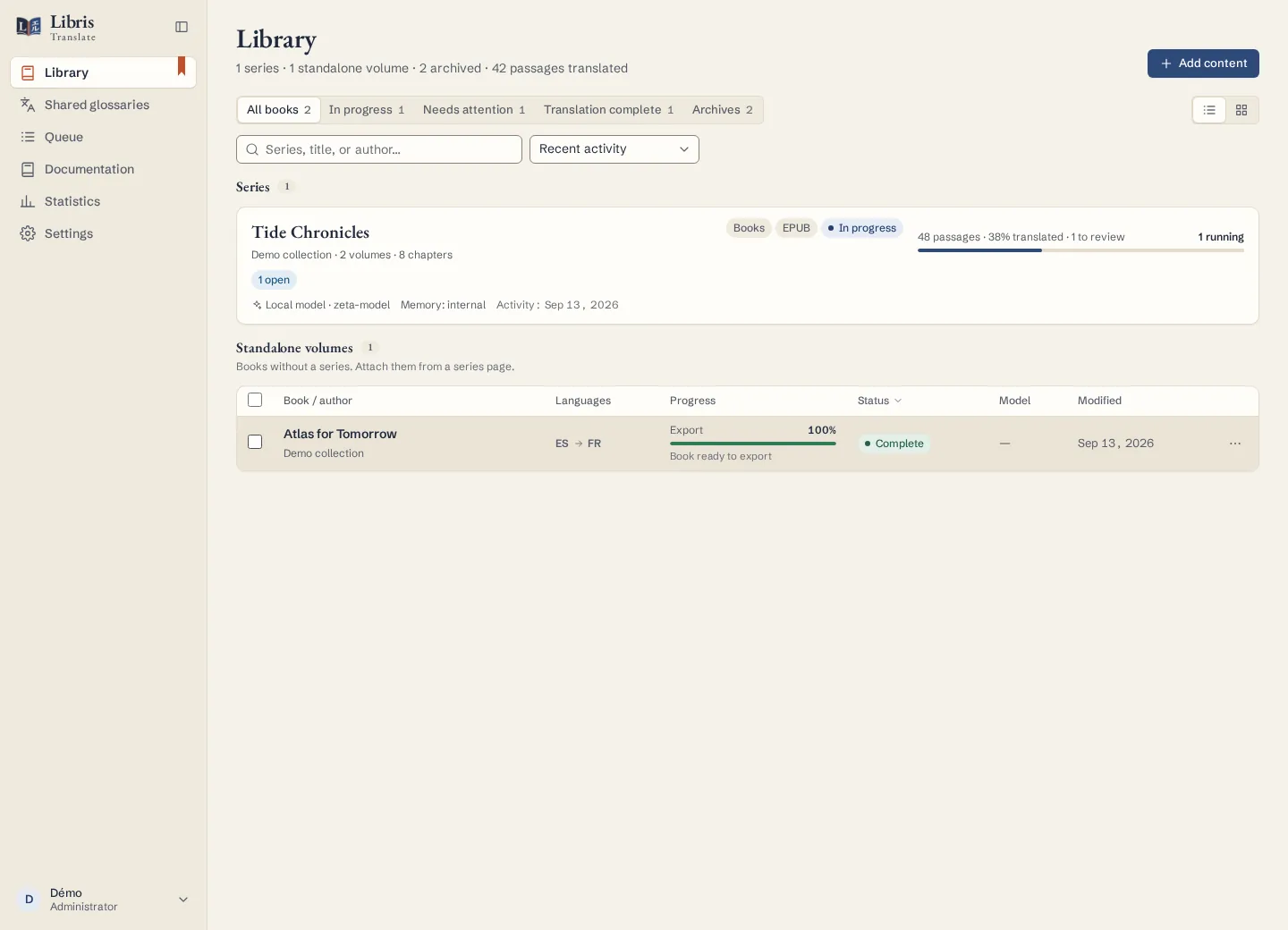
Steps
- In Library, type a series, title or author into “Search for a book”, then narrow the list with the filters: All books, In progress, Needs attention, Translation complete, Archives. “View” switches between Table and Cards.
- Tick several books and the “Actions for multiple books” bar appears. From there you can configure the selection in one go (common series, provider, target language, quality, common instructions), analyse or translate it, pause or resume it, or download its EPUBs in a single archive.
- “Archive” sets a book aside without erasing anything. It moves to Archives, where “Restore” brings it back. While it is archived, it starts no work.
- “Delete” removes the book, its translations and its jobs for good. To keep a copy, export it first as “Complete project (.zip)”.
What to know
The books of a selection progress in parallel, within the limits of the worker and of each provider; inside one book, passages keep their narrative order. A batch action reports its outcome book by book, so one failure does not hide the others. In the configuration dialog, fields left on “Keep” change nothing.
Fictional example
Select “Tide Lighthouse” and “The Keeper’s Return”, enter “Tide Chronicles” as the common series and click “Number by title”, then archive the first volume once it is finished.